

Learning how to invoice as a freelancer is one of those skills that directly affects how fast you get paid and how professional you appear to clients. Yet most freelancers piece together their first invoice from memory or a random template they found online, missing critical details that delay payment or create confusion. This guide cuts through the noise. You will find a clear breakdown of what belongs on every invoice, a real-world example, and practical steps you can follow starting today, whether you are just landing your first client or trying to tighten up a billing process that has grown messy over time.
Key Takeaways:
- Every freelance invoice needs seven core elements to be legally and professionally complete.
- A clear payment deadline and accepted payment methods reduce late payments significantly.
- Using a dedicated invoicing tool saves time and prevents costly formatting errors.
- Consistent invoice numbering and record-keeping protect you during tax season.
Content Table
Why Invoicing Matters More Than You Think
A poorly written invoice does more than slow down payment. It signals to clients that your business processes are disorganized, which can affect whether they hire you again. On the other side, a clean, complete invoice builds trust, sets clear expectations, and gives you a paper trail that matters come tax time.
Freelancers also face a real constraint that employees do not: you carry the full burden of collections. If a client disputes a charge or simply ignores your invoice, you have no HR department to escalate to. Your invoice is your first line of defense. It needs to be airtight.
According to data from Federal Reserve's 2024 Report on Payments , 80% of small firms experience payment-related challenges - and late payments are among the top financial stressors for independent workers. A well-structured invoice is a direct, practical response to that problem.
Anatomy of a Perfect Invoice
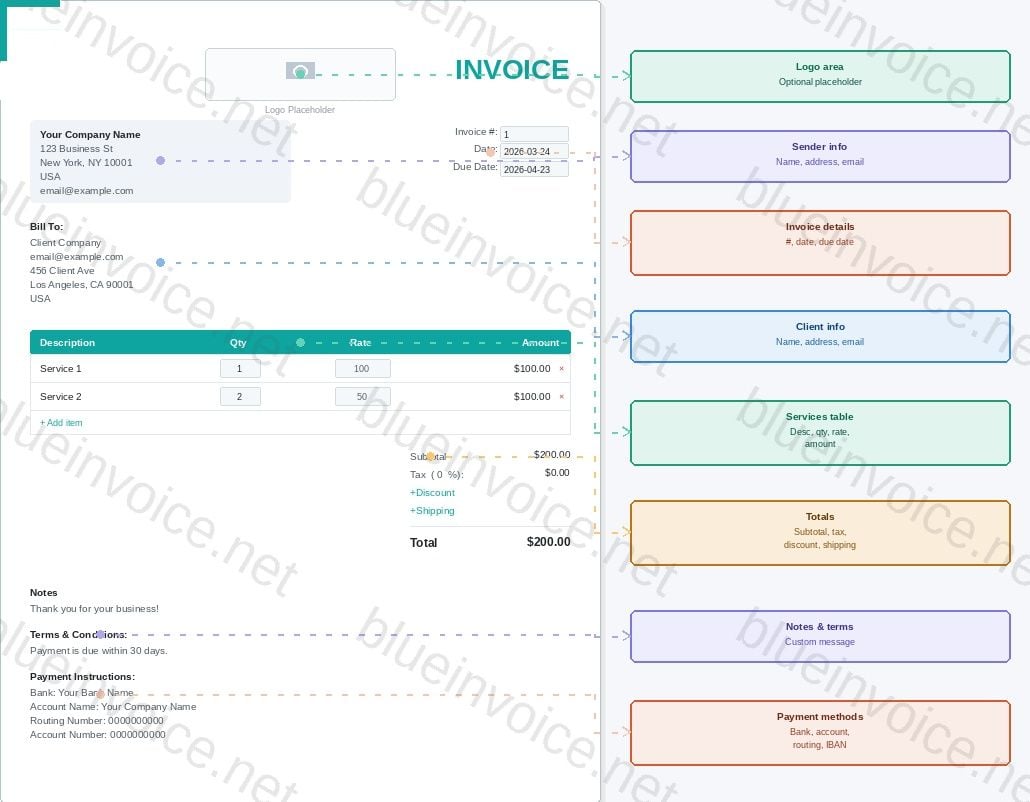
Understanding what to include on a freelance invoice is non-negotiable. Missing even one element can result in a client asking for a revised invoice, which pushes your payment date back by days or weeks. Here is every component you need:
- Logo - Upload your business logo at the top of the invoice. This is optional but adds a professional touch and reinforces your brand with every payment request.
- Your full name or business name - Listed in the sender block alongside your street address, city, state, ZIP, country, and email address. This must match the name on your bank account or payment platform.
- Invoice number, date, and due date - A sequential invoice number (e.g., INV-001) for record-keeping, the date the invoice was issued, and a specific due date. Always write out the full date rather than "Net 30" alone to remove any ambiguity.
- Client's name and address - Listed in the Bill To section. Use the legal entity name if billing a company, not just a contact person's name. Include their email, street address, city, state, and country.
- Itemized list of services - Each line item includes a description, quantity, rate, and calculated line total. Use the Add item button to add as many rows as needed. You can remove any row at any time.
- Subtotal, taxes, discounts, shipping, and grand total - The subtotal is calculated automatically from your line items. Add a tax percentage, an optional discount, and optional shipping costs. The grand total updates in real time.
- Notes - A short message to your client, such as a thank-you note or any project-specific remarks.
- Terms & Conditions - State your payment window clearly, for example "Payment is due within 30 days." You can also include a late fee clause such as "1.5% monthly fee on overdue balances."
- Payment Instructions - Your bank name, account name, routing number, and account number so the client knows exactly how to pay you. Include a SWIFT/IBAN if billing internationally.
For a deeper look at legal invoice requirements by country, visit the invoice requirements guide to make sure your document is compliant wherever your client is based.
How to Write an Invoice for Freelance Work: Step by Step
Knowing the components is one thing. Knowing how to write an invoice for freelance work in a way that actually gets paid is another. Follow these steps in order:
- Gather your project details before you open any tool. Pull up the contract or email thread confirming the scope and rate. Discrepancies between your invoice and what the client agreed to are the number one cause of invoice disputes.
- Choose your invoice number format and stick to it. A format like INV-YYYY-NNN keeps your records organized and looks professional. Never reuse numbers.
- Write clear, specific service descriptions. Instead of "Design work," write "Logo design - 3 rounds of revisions, delivered February 10, 2026." Specificity removes doubt.
- Double-check your math. If you are billing hourly, multiply hours by rate and verify the total manually before sending. A wrong number, even in your favor, damages trust.
- Set a realistic due date. Net 14 (14 days from invoice date) is increasingly standard for freelancers. Net 30 is common in corporate environments but gives clients too much runway if cash flow is tight for you.
- Send the invoice promptly. The moment a project milestone is complete, send the invoice. Delays on your end signal that payment is not urgent.
- Follow up systematically. Send a polite reminder three days before the due date and another the day it is due if payment has not arrived.
A Concrete Example
Here is what a real freelance invoice looks like in practice. Suppose you are a freelance copywriter who just completed a website content project for a SaaS startup.
Example Invoice - INV-2024-007
From: Sarah Chen Copywriting | sarah@sarahchenwrites.com | Portland, OR
To: Bright Loop Inc. | 400 Tech Blvd, Austin, TX | Accounts Payable: billing@brightloop.io
Invoice Date: February 1, 2026 | Due Date: February 15, 2026
- Homepage copy (500 words) - $300.00
- 3 Feature page descriptions (300 words each) - $450.00
- 1 Blog post (1,000 words, SEO-optimized) - $250.00
Subtotal: $1,000.00 | Sales Tax (0%): $0.00 | Total Due: $1,000.00
Payment: Bank transfer to Chase account #XXXXXX | Late fee: 1.5% per month on overdue balances
Notice what makes this invoice work: every service is named and scoped, the due date is a hard date (not vague), and the late fee policy is stated upfront without being aggressive. There is no ambiguity about what was delivered or when payment is expected.
Professional Invoice Format Tips
A professional invoice format goes beyond just having the right fields. Visual clarity matters too. A cluttered invoice with inconsistent fonts and no logical flow makes clients work harder to understand what they owe, which subconsciously creates friction.
- Use a consistent header with your logo or name prominently placed.
- Keep the itemized table aligned and easy to scan. Left-align descriptions, right-align amounts.
- Use white space generously. A cramped invoice looks rushed.
- Send invoices as PDF files, not Word documents or spreadsheets. PDFs preserve formatting across all devices.
- Match your invoice design to your other client-facing materials (proposals, contracts) for a cohesive brand impression.
If you want a head start on design, check out these free invoice templates that convert, with design tips built in for 2026.
Choosing the Best Invoicing App for Freelancers
Manually building invoices in Word or Google Docs works for your first few clients. Once you have five or more active clients, it becomes a liability. The best invoicing app for freelancers will handle numbering, tax calculations, payment tracking, and reminders automatically.
When evaluating tools, look for these capabilities:
- Automatic invoice numbering - Eliminates the risk of duplicate or skipped numbers.
- Multi-currency support - Essential if you work with international clients.
- Payment integration - The ability to accept credit cards or bank transfers directly from the invoice link.
- Recurring invoice support - Critical for retainer clients so you do not rebuild the same invoice monthly.
- Tax compliance features - Especially important for EU-based freelancers dealing with VAT rules. The European Commission's VAT for Businesses page outlines what is required.
- Data privacy compliance - Any tool storing client data should meet GDPR standards. Review the GDPR compliance information to understand your obligations.
How to Invoice as a Contractor
Knowing how to invoice as a contractor follows most of the same rules as freelance invoicing, but with a few distinctions worth noting. Contractors often work under a formal contract with a defined statement of work, which means your invoice must reference that contract explicitly.
Include the contract or purchase order (PO) number in your invoice header. Many corporate accounts payable departments will not process an invoice without a matching PO number. This is a real constraint that trips up new contractors regularly.
Contractors may also need to track billable hours against a project budget, so time-tracking integration in your invoicing tool becomes even more valuable. Some clients require a timesheet attachment alongside the invoice, so confirm this requirement before you send your first bill.
Additionally, if you are incorporated or operating as an LLC, your invoice must reflect your business entity name, not your personal name, to maintain liability separation and ensure proper tax treatment.
Conclusion
Invoicing is not just an administrative task. It is a direct reflection of your professionalism and a key driver of your cash flow. By including all the right elements, using a consistent format, and sending invoices promptly, you remove the friction that causes late payments. Whether you are just figuring out how to invoice as a freelancer for the first time or refining a system that has worked for years, the principles stay the same: be specific, be timely, and use the right tools. Your future self, the one not chasing unpaid invoices, will thank you.

Create Professional Invoices in Minutes
Our invoicing tool handles numbering, tax calculations, and payment tracking automatically, so you can focus on the work that actually pays you.
Try Our Free Tool →
Start by confirming the agreed rate and scope in writing before you build the invoice. Include your name, contact details, the client's details, an invoice number, an itemized list of services, and a clear due date. Send it as a PDF immediately after completing the work or reaching a billing milestone.
Net 14 (payment due within 14 days) is a practical standard for most freelancers. It gives clients enough time to process the invoice without leaving you waiting a month. For larger projects, consider a 50% deposit upfront with the balance due on delivery to protect your cash flow.
It depends on your location, your client's location, and the type of service you provide. In the US, most service-based freelancers do not collect sales tax, but rules vary by state. In the EU, VAT obligations depend on your registration status and whether your client is a business or consumer. Always check local rules or consult a tax professional.
The core structure is the same, but contractor invoices often need to reference a purchase order number or contract ID that the client's accounts payable department requires. Contractors working through an LLC or corporation must also invoice under their business entity name, not their personal name, for proper legal and tax treatment.
Send a polite reminder three days before the due date, another on the due date if unpaid, and a firmer follow-up one week after the due date. If payment is still not received after 30 days, reference your late fee policy in writing and consider whether to pause work for that client until the balance is cleared.