
Kunde im eigenen Land
Berechne die Mehrwertsteuer zum Steuersatz deines Landes. Die Rechnung weist den Satz, den MwSt.-Betrag und deine USt-IdNr. aus.
Netto 1,500.00MwSt. 21% 315.001,815.00
This free invoice generator works out the VAT as you type: fill in the sheet, set the rate, and download a PDF. Ohne Anmeldung, ohne Installation.
A VAT invoice is an ordinary invoice with the tax laid out so your client can reclaim it. It names both businesses, shows your VAT registration number, and splits the money into the net price, the VAT rate, the VAT charged, and the total. If you are registered for VAT, this is the document you send. If you are not, you send an invoice without VAT: set the rate to 0% and the PDF leaves the VAT line out.
Im Vereinigten Königreich, in Irland und in weiten Teilen des Commonwealth heißt dasselbe Dokument oft „VAT tax invoice“ oder einfach „tax invoice“. Der Name ändert sich, die Aufgabe nicht: Es ist der Beleg, mit dem dein Kunde die Vorsteuer abziehen und das Finanzamt sie mit deiner Steuererklärung abgleichen kann.
| Normale Rechnung | Rechnung mit MwSt. | |
|---|---|---|
| Deine USt-IdNr. | - | ✓ |
| MwSt.-Satz und -Betrag | - | ✓ |
| Netto- und Bruttobetrag | Nur Gesamtbetrag | ✓ |
| USt-IdNr. des Kunden | - | Bei grenzüberschreitenden B2B-Umsätzen |
The VAT line is always the net amount multiplied by the rate. Change the numbers in this VAT invoice example to see it.
Add up the line amounts to get the net subtotal, multiply it by the VAT rate, and add the result to reach the amount due. The sheet above works out the VAT like a VAT calculator as you type, but it helps to know what each number in the VAT breakdown means before you send it.
Entscheide dich für eine Rundungsmethode und bleib dabei. Am gängigsten ist es, die Mehrwertsteuer einmal auf die Zwischensumme zu runden. Das liefert auch das sauberste Ergebnis.
1,500.00 × 21% = 315.00
Under the VAT invoice requirements in Article 226 of the VAT Directive, the EU VAT invoice format adds these seven details to an ordinary invoice.
Wo dein Kunde sitzt und ob er ein Unternehmen ist, entscheidet darüber, was in der MwSt.-Zeile steht.
Berechne die Mehrwertsteuer zum Steuersatz deines Landes. Die Rechnung weist den Satz, den MwSt.-Betrag und deine USt-IdNr. aus.
Netto 1,500.00MwSt. 21% 315.001,815.00
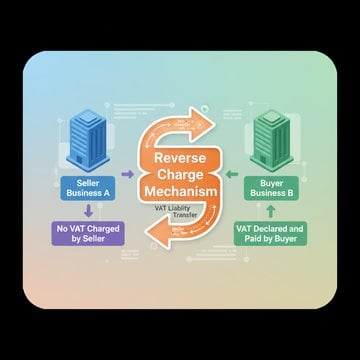
In der Regel wird keine Mehrwertsteuer berechnet: Dein Kunde führt sie im Reverse-Charge-Verfahren ab. Gib beide USt-IdNrn. an, setz den Satz auf 0 % und füge einen Hinweis wie „Steuerschuldnerschaft des Leistungsempfängers, Artikel 196 MwSt-Systemrichtlinie“ hinzu. Prüfe die USt-IdNr. vorher.
Netto 1,500.00MwSt. 0%1,500.00
Since 1 July 2021, once your cross-border sales to consumers pass €10,000 a year, goods and digital services are taxed at the customer's rate, usually declared through the One-Stop Shop (OSS).
Netto 100.00MwSt. 20% (FR) 20.00120.00
Du kannst in jeder Währung abrechnen. Wird aber Mehrwertsteuer berechnet, muss der MwSt.-Betrag auch in der Währung des Landes angegeben werden, in dem sie geschuldet wird. Verwende dafür den Wechselkurs der Europäischen Zentralbank oder deiner Steuerbehörde zum Rechnungsdatum.
Füge im Editor unter den Summen einen Wechselkurs hinzu. Die Rechnung weist dann die Mehrwertsteuer und den Gesamtbetrag zusätzlich in deiner zweiten Währung aus, direkt unter den ursprünglichen Beträgen.
As of November 2026, standard VAT rates in the EU run from 17% in Luxembourg to 27% in Hungary, according to the European Commission's Taxes in Europe Database (TEDB). A reduced VAT rate applies to some goods and services.
Fill in your details and your client's on the sheet above, add the lines, and set the VAT rate; the totals update as you type. Then choose Download PDF; no account is needed for that. With a free account, Share makes a link and a QR code, and Save to Account keeps the invoice.
Yes. Making, previewing, and downloading invoices costs nothing and needs no sign-up; sharing and saving need a free account. The PDF invoice generator builds the file in your browser, so it downloads straight away.
Yes, this is an invoice generator with logo upload built in. Click the logo area at the top of the sheet to choose an image, then drag and resize it; the PDF prints it in the same place.
Nur wenn du umsatzsteuerlich registriert bist. Registrierte Unternehmen in der EU müssen bei Verkäufen an andere Unternehmen eine Rechnung mit Mehrwertsteuer ausstellen, meist auch dann, wenn ein Privatkunde danach fragt. Liegst du unter der Registrierungsschwelle deines Landes und bist nicht registriert, stellst du normale Rechnungen ohne Mehrwertsteuer aus.
Rechtlich ist das erlaubt, solange die Rechnung Nettobetrag und Mehrwertsteuer für jeden Steuersatz getrennt ausweist. Der Editor hier verwendet einen Steuersatz pro Rechnung. Bei gemischten Sätzen stellst du also für jeden Satz eine eigene Rechnung aus.
With the VAT at 0%, both VAT numbers printed, and a note that names the rule: “Reverse charge, Article 196 VAT Directive” for services, or “Exempt intra-Community supply, Article 138 VAT Directive” for goods. Check your client's number with the VAT number checker before you send it.
Meistens nicht. Warenexporte verlassen die EU mit 0 % Mehrwertsteuer, und die meisten Dienstleistungen für Unternehmen außerhalb der EU fallen nicht unter die EU-Mehrwertsteuer. Die Rechnung weist daher 0 % aus, mit einem kurzen Hinweis auf den Grund. Ortsgebundene Leistungen, etwa Veranstaltungen oder Immobilien, folgen eigenen Regeln.
Only when it meets the rules for a simplified invoice, which many EU countries allow for small amounts, typically up to €100 and in some countries up to €400. Otherwise a receipt only confirms that you were paid, while a VAT invoice asks for payment and documents the tax.
Ja. Gib unter den Summen einen Wechselkurs ein, dann weist das PDF die Mehrwertsteuer und den Gesamtbetrag zusätzlich in der zweiten Währung aus. So verlangen es die EU-Regeln für Rechnungen mit Mehrwertsteuer in Fremdwährung.